


Hourly booking software for homestays and private movie rooms
HostBooking ·
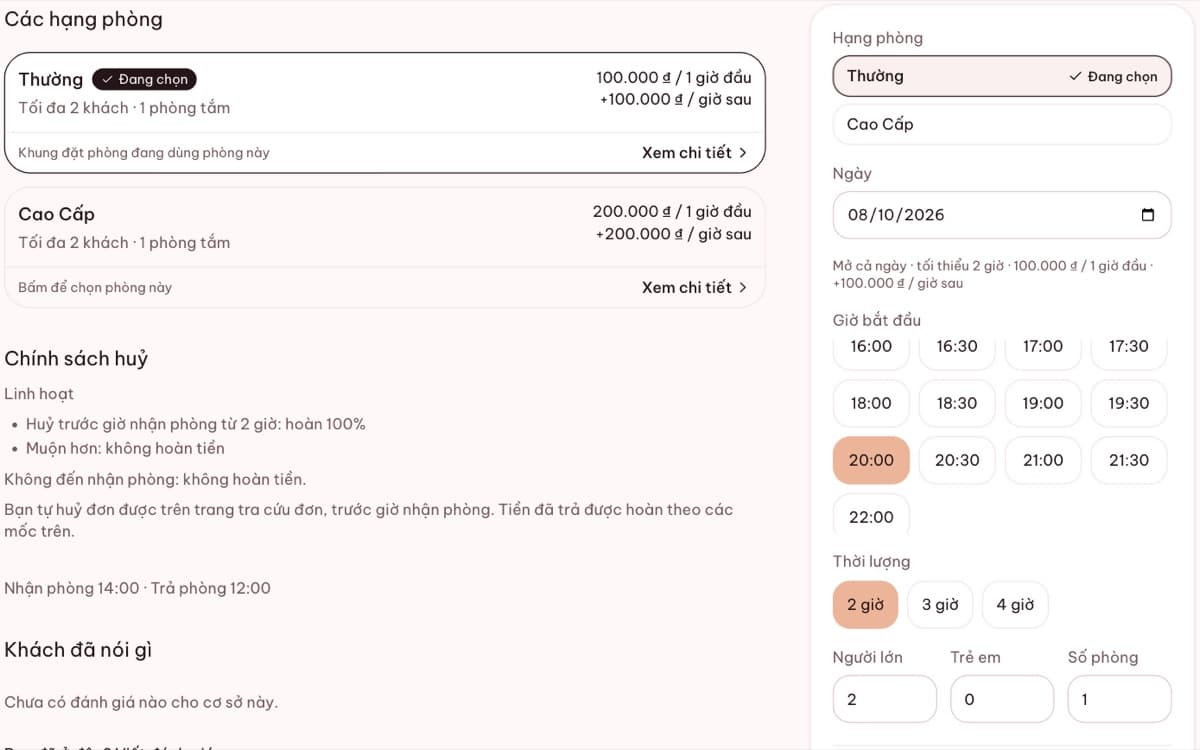
HostBooking lets you sell rooms by the hour. Guests see which hours are free, choose a start time and how many hours, and the price is worked out from the first hour, each extra hour and weekend rates, with cleaning time kept free between two guests. It suits hourly homestays, private movie rooms and the staycation model.
Why does hourly booking need its own software?
A room rented by the hour can take 3–5 guests a day. Each stay needs time for cleaning, and prices usually differ between the first hour and the rest, daytime and overnight, weekdays and weekends. Keeping it by hand in Zalo or Excel makes overlapping hours and wrong totals easy, especially on a Saturday night.
How HostBooking handles hourly bookings
- Time slots from the real calendar: guests only see free hours, with no need to message and ask.
- Minimum length and time step: for example a 2-hour minimum, in 1-hour steps.
- Cleaning time: a gap is kept free between two bookings.
- Prices worked out for you: first hour, each extra hour, weekend and holiday surcharges.
- Overnight and daily stays too on the same room, with no overlapping on the calendar.
- QR deposits: guests transfer the exact amount when they book, so the slot is held for sure.
The video below is filmed on the real screens: turning on hourly sales for a place, setting the first-hour, extra-hour and overnight prices, then taking an hourly booking.
A pricing example
| Setting | Example |
|---|---|
| First hour | 120,000 ₫ |
| Each extra hour | 60,000 ₫ |
| A guest books 3 hours on a weekday | 120,000 + 2 × 60,000 = 240,000 ₫ |
| Overnight (22:00 – 10:00) | its own price, for example 350,000 ₫ |
These numbers are only an example; you set your own prices in the admin.
Movie rooms and rooms with a projector
Movie rooms are usually booked by couples or small groups, in the evening. You set an hourly price, a guest limit, list the amenities (projector, Netflix, bathtub) and add house rules. Guests can find a room with a sentence like "Saturday night, 2 people, under 300k" in the AI room search.
A real site running today: The Six in Thu Dau Mot sells private rooms for couples by the hour and overnight on HostBooking. Open it and pick a time slot to see the price worked out and the free hours exactly as a guest does.
Running several branches
Each branch is a place in the same HostBooking account. Every place has its own rooms, prices, cleaning time and ways of selling: one branch can sell by the hour and overnight while another only sells by the day. Guests use one website and pick the branch they want.
- One account per staff member: invite by email, choose the Property manager role and the places they look after. They only see the rooms and bookings of those places.
- Permissions by role: make Front desk, Housekeeping and Accountant roles from templates, then switch each permission on or off. A branch receptionist who has no need for the profit and loss simply does not get it. See staff roles.
- Today’s board per branch: the front desk opens Today, picks the place and sees which rooms are taken, who arrives next and which rooms still need cleaning. See today’s room board.
- Reports by place: revenue, occupancy and hourly occupancy for each branch, alone or side by side, with a CSV for your accountant. See reports.
- Staff pay: each person’s housekeeping tasks, sales and shifts come straight from the system for the month-end payroll. See staff and payroll.
How many places and staff accounts you get depends on the plan; see pricing.
Read more: running an hourly homestay.
常见问题
Can it stop two guests booking the same hours?
Yes. Once a time slot has a booking, including one you entered by hand, it disappears from the booking page.
Can one room sell both by the hour and overnight?
Yes. You turn on each way of selling per place, and set hourly and overnight prices per room type. Everything sits on one calendar, so hours never overlap.
Can staff at one branch see another branch’s bookings?
Not unless you give them that branch. A property manager account only sees the places chosen for it; the brand owner sees them all.
Does it account for cleaning time?
Yes. You set the cleaning time in minutes, and that gap is kept free after every booking.