

Management software for serviced apartments across several buildings
HostBooking ·
A serviced apartment operator needs to know, for every unit in every building, whether it is free or occupied, which channel the guest came from, whether it has been cleaned, and what each building earns. HostBooking makes each building a property and each apartment a room with its own calendar, syncs OTA calendars per unit, creates cleaning tasks on checkout and splits costs and profit by property.
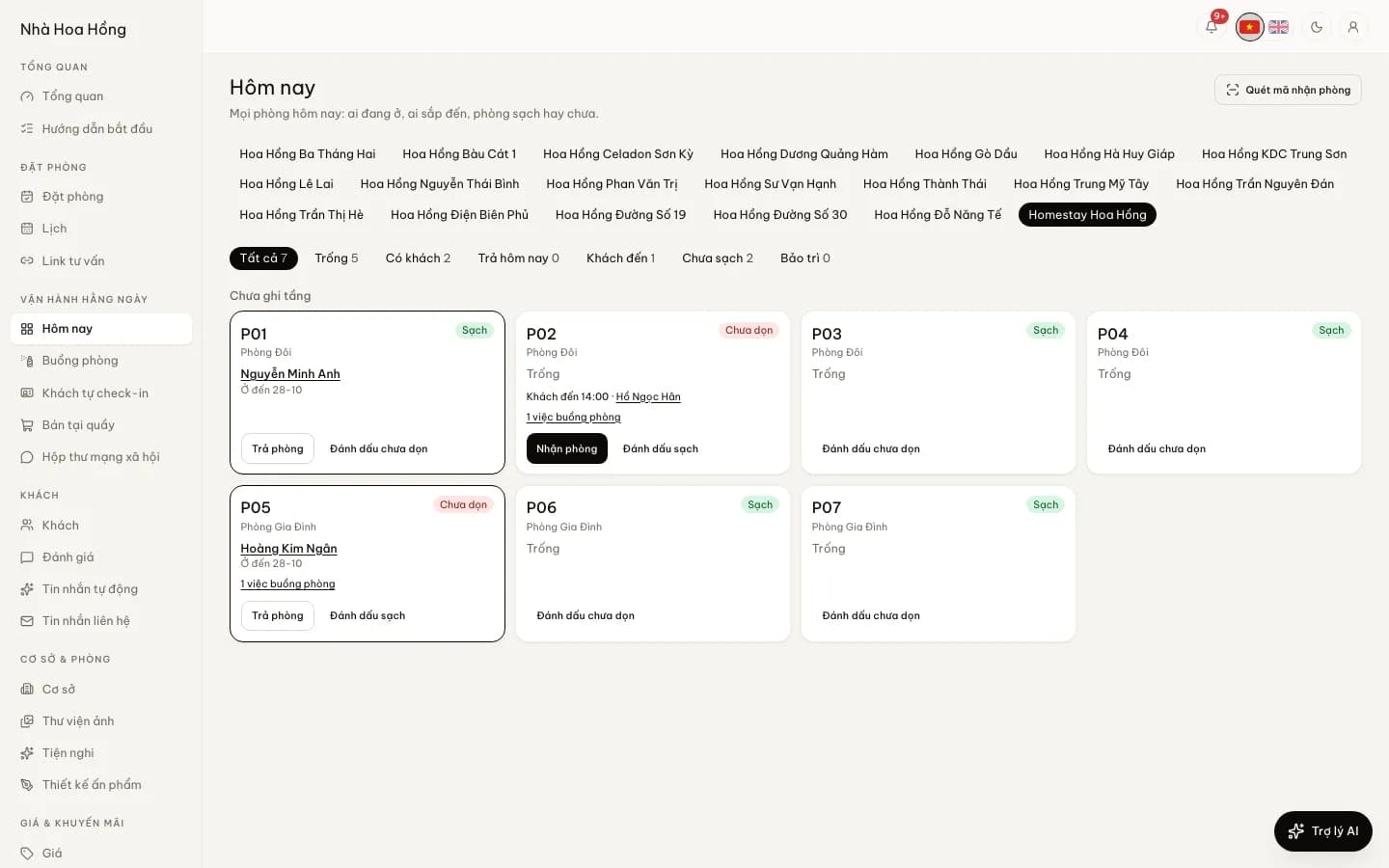
How an apartment portfolio differs from a homestay
A homestay has a few rooms under one roof and the owner can see everything. A portfolio of 15–50 apartments spread over three or four buildings is different: each unit is usually its own listing on Airbnb, Booking.com or Agoda, guests let themselves in with a door code, cleaners move between buildings, some units sell by the night and some host a business traveller for a month. The biggest risk is not one unit but information drifting apart: an OTA calendar not yet blocked, a door code not changed, a unit not cleaned when the guest arrives.
Setting up an apartment portfolio on HostBooking
- Each building is a property, with its own address, map, check-in and check-out times and arrival instructions.
- Each apartment is a room, grouped into room types by layout (studio, one-bedroom, two-bedroom), each type with its own rates and units left.
- Large buildings split into areas (for example "Floors 5–10" or "Block B") to filter the calendar and room board.
- Every plan has unlimited properties and rooms; create many properties, room types and rooms at once from the Excel template.
A calendar per unit: nightly, hourly and long stays
Each building’s booking calendar gives every unit a row; drag to change unit or dates, and two bookings can never sit on one unit. A long-stay unit can be viewed across a whole month on one screen. A property can sell by the night, by the day and by the hour on the same calendar. Long-stay guests get a discount by number of nights through a long-stay deal in promo codes and deals, with a minimum stay and a choice of which buildings or unit types it covers.
HostBooking prices by the night (or by the hour) plus long-stay deals; it does not yet have monthly lease contracts, monthly rent invoices or metered electricity and water billing. If most of your units are let for 6–12 months, software built for long-term rentals will suit you better.
OTA sync per unit
OTA sync (from the Basic plan) gives every unit its own export link and import field, so when each apartment is its own Airbnb listing, a booking for one unit blocks only that unit. OTA calendars are pulled every 5 minutes; when a night clashes, the manager is told at once and moves the guest to a free unit in one tap. iCal carries dates only, so to get bookings with guest name, price and reservation code, forward OTA booking emails to your brand’s own address. Step-by-step calendar setup is in syncing iCal calendars to avoid double bookings.
Cleaning between stays
A checkout creates a cleaning task for that unit. Cleaners take it on their phone, tick the checklist, take photos and note missing supplies; the unit goes back to Clean only when an inspector passes it, and the desk or manager is warned if a unit is still dirty with a guest about to arrive. Recurring jobs such as servicing the air conditioning or checking extinguishers appear on the right day. See housekeeping and the homestay cleaning routine.
Self check-in and door codes per booking
Serviced apartments often have no reception. With guest self check-in (from the Basic plan), guests enter each person’s details, photograph their documents and sign the house rules on their phone before arriving; you approve once and the stay list is done. Connect a TTLock smart lock and each stay gets its own 6-digit code that only works during the stay and is deleted on checkout, cancellation or a change of unit (from the Professional plan; lower plans buy it per lock). See also keypad locks for homestay self check-in.
Staff by building
Each staff member is given one or a few properties and sees only those buildings’ bookings, calendars and tasks. Roles decide the rest: cleaners do not see guest phone numbers, a building manager does not see the whole portfolio’s profit unless you allow it, and manager accounts have two-step sign-in. Every important action is logged.
Costs, profit and reports by building and by unit
Expenses and profit and loss: each expense belongs to a property, a unit or a booking; unit rent, building management fees and internet are entered once and repeat monthly. Profit and loss can be viewed per building (brand-wide costs left out) or for the whole portfolio. Revenue reports show occupancy, ADR and RevPAR per property, filter by unit and channel, include OTA commission and net revenue, and export to CSV.
If you manage apartments for other owners: HostBooking does not yet have a dedicated owner statement. Today you filter the reports to that owner’s units and export CSV, together with the expenses attached to those units, and send the owner a view-only calendar link (choose which units show, whether guest names show, set an expiry, revoke any time).
VietQR deposits and stay declaration
Guests who book on the portfolio’s own booking website pay the deposit with a VietQR code that carries the amount and booking reference; the money goes straight to your account, and with SePay connected the booking confirms itself when it lands. Guest details from self check-in or from scanning a chip ID card export as a stay declaration file in the police residence portal’s format; sending it is still up to you. Apartment buildings have extra rules, see renting apartments on Airbnb in 2026.
Google Sheets or software for 20 apartments?
| Job | Excel, Google Sheets, Zalo | HostBooking |
|---|---|---|
| Knowing which unit is free tonight | Open each building’s sheet, check against 3 OTAs | Today’s room board for each building |
| Blocking OTA calendars when booked | Block 20 listings by hand on each OTA | iCal per unit, pulled every 5 minutes |
| Telling cleaners between stays | A Zalo group message | A cleaning task made on checkout |
| Door codes | Changed by hand, sent to the guest | A code per booking, made and deleted (TTLock) |
| What staff can see | Anyone with the sheet link sees every building | Only their buildings, by role |
| Profit per building | Added up at month end | P&L per property, recurring costs recorded |
| Stay declaration | Copy guest details again | Export from approved check-ins |
| Software cost | VND 0 | Free plan up to 50 bookings a month; paid plans per brand |
Google Sheets works when you have a few units and do everything yourself. With 20 units you usually pass 50 bookings a month and several people work at once, so the slowest part becomes reconciling: the sheet with the OTAs, the OTAs with the Zalo group. Read more: Excel or software.
Pricing and getting started
- A free plan for life: unlimited properties and units, up to 50 bookings a month. Good for setting up the whole portfolio and getting staff used to it.
- Paid plans by the month or year, per brand, not per unit: from the Basic plan bookings are unlimited, with OTA sync and self check-in. See pricing.
- No commission on bookings; guests pay straight into your account.
- A 14-day trial of the full product when you sign up, no card needed.
- Moving from Excel or another system: see switching to HostBooking for what we help with.
Frequently asked questions
Can it manage apartments in several different buildings?
Yes. Each building is a property with its own address, calendar, staff and arrival instructions; reports and profit and loss show each building or the whole portfolio. Every plan has unlimited properties and units.
Each unit is its own Airbnb listing. How does sync work?
Every unit has its own export link and import field, so a booking for one unit blocks only that unit on every channel. OTA calendars are pulled every 5 minutes, from the Basic plan or with the OTA sync add-on.
Can I rent by the month?
Yes in the sense that a guest books 30 nights at nightly rates with a long-stay deal by minimum nights, and you can see each unit’s month on one screen. There are no monthly lease contracts, monthly rent invoices or metered utility billing yet.
Is there a statement for apartment owners?
Not a dedicated one yet. Filter the revenue report to that owner’s units and export CSV, attach costs to each unit, and give the owner a view-only calendar link with an expiry date.
Can cleaners see guest details?
Not unless you allow it. The Housekeeping role sees only the cleaning tasks for its buildings, not guest phone numbers or amounts.