

A booking website with more pages and a chat that answers guests
Beyond the home page, write pages of your own, receive messages from a contact form, let AI answer questions about rooms and prices, and put a booking box on your other websites.
Included from the Professional plan.
 Tap to view
What it does
Pages & AI chat
Pages beside the home page
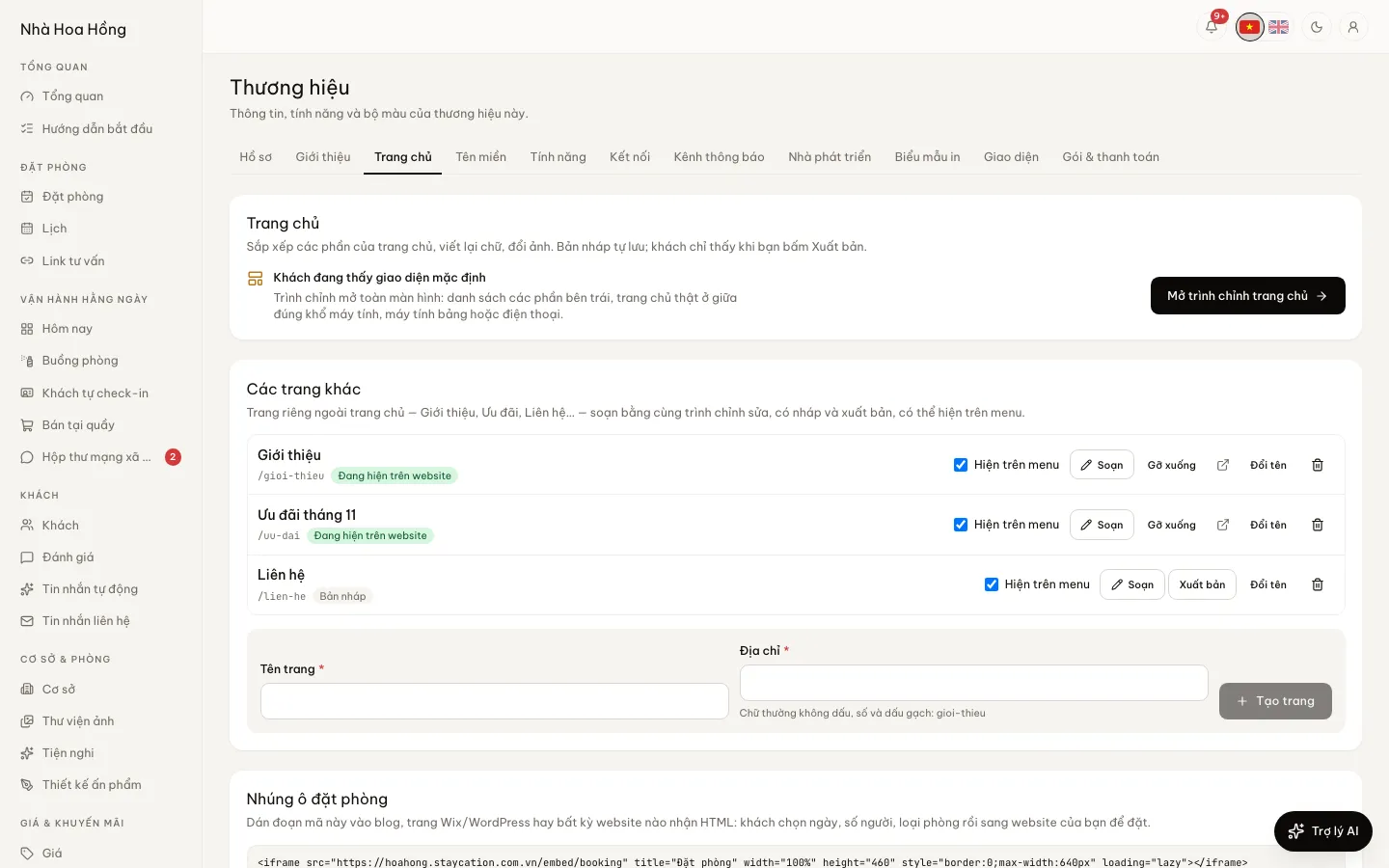
About, Offers, Contact… built in the same editor as the home page, with drafts and publishing, and optionally in the menu. Pages in the menu go into the sitemap for Google.
New sections
A YouTube video, a Google Maps map, a price list of up to 8 items, a countdown for an offer, and a contact form.
A contact form that keeps spam out
Guests leave a phone or email with a message. It lands in Contact messages and rings the bell. A hidden trap field stops bots and sending is rate-limited.
AI chat for guests
The Ask us bubble on your site answers about rooms, prices and free dates from your real data. What it cannot answer, it hands over with your call, Zalo and email buttons.
Guests sign in with a code
No password: guests enter an email or phone and get a 6-digit code by email or Zalo. Each code works once and expires after 5 minutes.
An embeddable booking box
Copy the Embed code to put a dates-and-guests box on a blog or another site. See free rooms takes the guest to your search page.
How it works
Up and running in a few steps
- 1
Open Brand, tab Home page, section Other pages: give a title and address and tap Create page.
- 2
Tap Edit, add sections such as a price list, map or contact form, then Publish and tick Show in menu.
- 3
Messages from the form are in Contact messages; once dealt with, tap Mark as handled.
- 4
For a booking box on another site, copy the Embed code under Embed a booking box.
Pages of your own, the new sections, AI answers in the chat and sign-in by code start on the Professional plan. The embeddable booking box is on every plan. Codes by Zalo need the brand’s Zalo connected; otherwise guests use email.
Questions
Common questions
Can the AI chat book rooms or promise a wrong price?
No. It only reads rooms, prices and free dates, then points the guest to the search page to book. When unsure, it gives your contact details.
Does the chat bubble show on lower plans?
Yes, but only with call, Zalo and email buttons so guests can reach you. Automatic AI answers start on the Professional plan.
What if a page address clashes with an existing page?
It is refused, so your own page can never hide the search or booking pages.
Who can edit these pages?
Whole-brand managers. A manager assigned to some properties cannot edit the shared website.